Downtime a-z.lu and findit.lu, Monday 10th April, 7-12h

Update: The updates are down and systems are running again.

If you experience any problems, please send a mail to help@findit.lu.

————————————

Due to software updates a-z.lu and findit.lu won’t be available Monday,10th April 2017 between 7.00 and 12.00 h.

Access to licensed electronic resources is not possible during that time.

We apologize for any inconvenience.

Trial Nomos eLibrary April 2017

Nomos eLibrary

Nomos eLibrary – Willkommen in der Wissenschaft.

Im April 2017 steht allen Nutzern der Uni-Bibliothek, Nationalbibliothek sowie dem LIST und LIH ein Test-Zugriff auf sämtliche Inhalte der Nomos eLibrary zur Verfügung.

Mit der Nomos eLibrary bietet der Verlag einen komfortablen Zugang zu Verlagsinhalten aus den Bereichen Recht, Politik, Wirtschaft, Medienwissenschaft & Kommunikationsforschung, Geschichte, Soziologie, Bildungsforschung, Kulturwissenschaft, Europa, Gesundheitswissenschaft, Philosophie und Religion.

Das Portal enthält derzeit 5255 Monographien, 2024 Sammelbände, 1713 Zeitschriftenhefte, 51 Handbücher, 142 Lehrbücher.

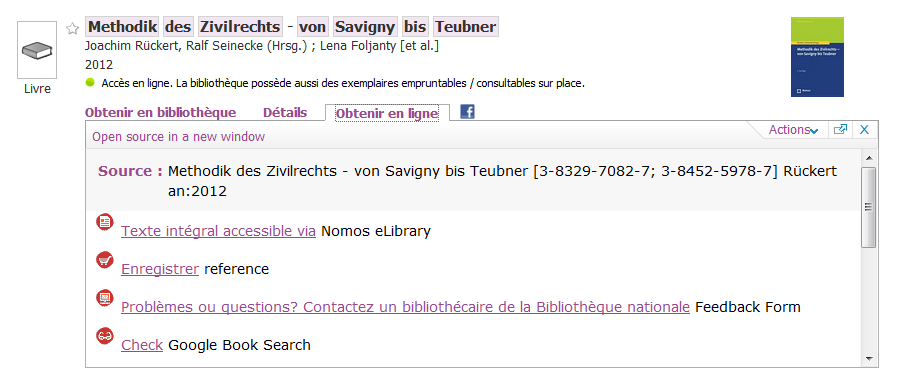
Alle verfügbaren Zeitschriften und Bücher sind während der Zeit des Testzugangs auch in a-z.lu indexiert, so dass Printausgabe und Online-Version gleichzeitig im Katalog gefunden werden:

nomos - az

Der Zugriff auf die Nomos eLibrary erfolgt über a-z.lu oder direkt hier: Nomos eLibrary.

Update current access problems: Nature journals and searching articles in a-z.lu

UPDATE 16/03/17: Access to Nature journals is now working again.

UPDATE 14/03/17: Access to Nature journals is now restored for all issues published from 2012 until 2017. Access to older articles will be back again later today or tomorrow. If you need a specific article, please send a mail to help@findit.lu and we will try to get it for you.

We apologize for any inconvenience.

————————————————————-

UPDATE: Searching for articles in a-z.lu is working again. We are still waiting for solving the issue with Nature publications.

No access to Nature journals

As you may know, all findit.lu users have access to nearly all Nature publications: http://www.nature.com.proxy.bnl.lu/siteindex/index.html

Accidentally, our access to  was cut off. Due to technical problems we don’t have access to full texts from Nature journals at the moment. Everything is prepared for our access to be reactivated, but it may take until next week (8 or 9 march) until access will work correctly again.

Finding articles in a-z.lu

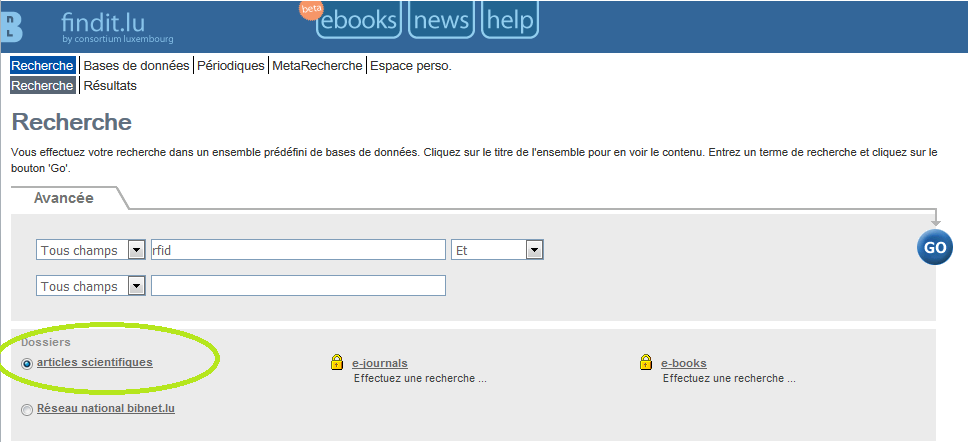
Due to another technical problem, searching for articles is currently not possible in a-z.lu. Please use findit.lu or Google Scholar instead to find articles.

Check our guide to see how to enable the findit.lu button in Google Scholar: Enable your browser to show “Findit.lu-button” in external databases

findit pci

We will keep you up to date and apologize for any inconvenience.

If you experience any further technical problems, please send us an email to help@findit.lu.

Update: continuing access problems a-z.lu

Technical updates for a-z.lu are continuing today, 23rd February, so there might be further access problems during the day.

Access to electronic resources via findit.lu is possible without problems!


Due to system updates a-z.lu won’t be available tonight, Wednesday, 22nd February between 19.00 and 20.00 h.

A system backup from 12th February will be deployed, so if you did any changes on your personal settings on a-z.lu during the last 10 days, these might be removed and you will have to update it once again.

We apologize for any inconvenience.

New database: EuroCases

Consortium Luxembourg is happy to announce that access to EuroCases is now open. eurocases logo

EuroCases is a unique multilingual web-based legal informational service providing access to case law of the leading jurisdictions in Europe related to the application of European Union law. It is maintained and continuously updated by the leading Bulgarian legal information provider Apis (www.apis.bg). EuroCases builds upon the achievements of the affiliated company Apis Hristovich Ltd. within the EUCases project (http://eucases.eu) supported by the European Commission under the 7th Framework Programme for research and innovation of the European Union.

The main advantage of the service lies in its cross-border nature – in cases where provisions of EU law should be applied, users can draw inspiration and ideas by using relevant case law of other jurisdictions, which is not offered by their national service providers.

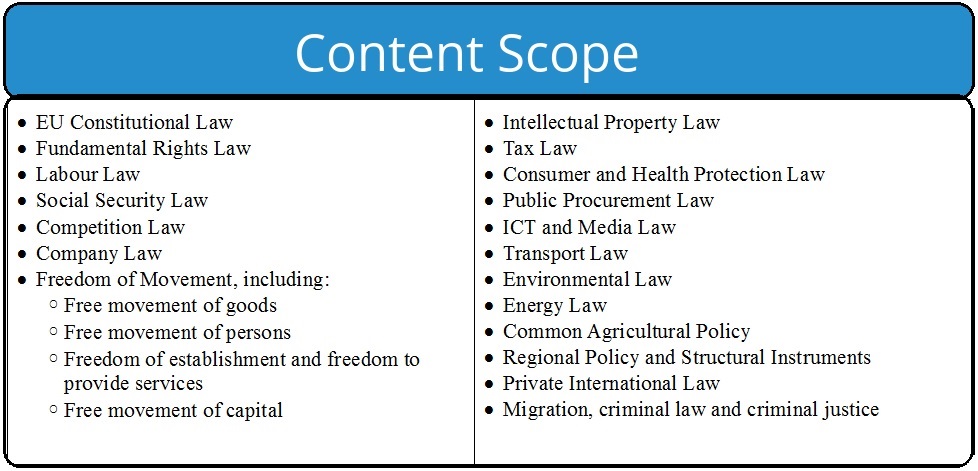
National and European case law is covering the following 19 thematic areas of EU law:

eurocases Scope


In addition, the subscription comes with Link Detector, a free software tool that checks for legal citations to EU legislation and case law and establishes links to EuroCases online database.

Link Detector is an extension (add-on) to the browsers Internet Explorer®, Google Chrome® and Mozilla Firefox®, and an add-in to the word processor Microsoft Word®. Its primary mission is to assist legal professionals working with EU law. To this end, Link Detector identifies legal citations to EU legislation and to judgments of the EU Court of Justice in the web page opened by the user (respectively, in the document edited by the user) and establishes links to the cited EU acts and/or provisions thereof published in the EuroCases online database.

Local access inside the library buildings is offered to EuroCases for all users with a valid library card from either National Library or University.

Access via a-z.lu: http://a-z.lu/BIBNET:All_content:BNL_MLBNL03960

They’ve Sharedit! Springer Nature’s content sharing initiative

sharedit v1Springer Nature is delighted to announce that it has rolled out its free content sharing initiative, SharedIt, across its entire owned portfolio of over 1,300 journals and an additional 1,000+ co-owned and partner-owned journals. This allows researchers and authors to easily and legally share links to free-to-read versions of research articles anywhere, including social media platforms, repositories and personal websites.

How do I use it?

On the webpage of every article you’ll see a ‘Share’ or ‘ Share article’ option. If you click on this, for every article you have subscription access to , you’ll be provided with a SharedIt link, which you can copy and provide to other interested parties or post anywhere, including via social networks such as Twitter or on scholarly collaborative networks such as ResearchGate or Academia.edu, for non – commercial, personal purposes.

Are there any limits to how much can be shared?

Reasonable sharing is encouraged for non – commercial, personal use.

What is the benefit of using SharedIt?

SharedIt allows you to share research articles you or your institution have subscribed to in a legitimate way, facilitating discussions and collaborations with other researchers who may not have a subscription. SharedIt links will take readers to the most up to date, online version of the article. SharedIt also allows us to better understand how research is being used, as usage can be tracked, unlike when a PDF is downloaded and shared. Springer Nature is committed to making information about usage available on a regular basis.

A summary of the results of the first 12 – month trial of the content sharing initiative can be found here .

Access to

SpringerLink Journals and Ebooks

Nature Journals Collection

More than 130.000 new ebooks available via ebrary

book covers ebrary

It’s still Christmas time, so we have a special gift for you! From now on you have access to more than 130.000 new ebooks on the ebrary ebook platform.

Subjects covered:

  • The Arts
  • Business
  • Education
  • Health & Medicine
  • History
  • Law
  • Literature & Language
  • Religion & Philosophy
  • Science & Technology
  • Social Sciences

The collection includes ebooks from renowned publishers like Oxford University Press, Taylor & Francis, MIT Press, Harvard University Press, Elsevier Science, Thieme Medical Publishers, Elsevier and many others.

There is no limit in the number of users that can access an ebook at the same time. You may download an ebook for up to 2 weeks. To download it you will need to create an account on ebrary and download Adobe Digital Editions (for mobile devices: Bluefire Reader app or similar).

Help

Ebrary LibGuide

Help Videos on YouTube

All ebooks can also be found and accessed via findit.lu and a-z.lu.

Alternatively, you may access all of the available ebooks on ebrary here.

All ebooks can be accessed from anywhere with a valid library subscription of National Library, University, LIST or LIH.

ebrary-reader-banner

Ce Noël, profitez de Naxos Music Library et PressReader sur vos Smartphones !

PressReader permet à nos lecteurs d’accéder à des milliers de journaux et magazines locaux, nationaux et internationaux à contenu intégral en ligne, ou pour tablettes, smartphones et lecteurs électroniques fonctionnant sous iOS, Android, Android pour Amazon, Windows et Blackberry.

Les étapes à suivre sont:

1. Conectez–vous sur PressReader dans l’enceinte de l’Université du Luxembourg ou la Bibliothèque Nationale.

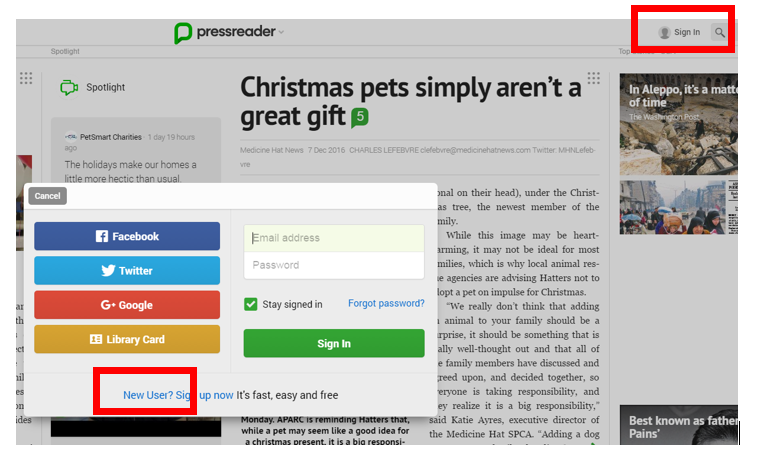
2. Créer un compte d’utilisateur Pressreader en cliquant sur Sign in.
pressr1

3. Télécharger l’application Pressreader sur votre tablette ou smartphone

4. Lancer l’application et logez-vous avec vos identifiants Pressreader et pas ceux de votre carte lecteur Bibnet

5. Vous pouvez dès maintenant télécharger vos titres préférés sur vos appareils

6. Maintenant vous aurez accès pendant 7 jours en dehors du réseau de la Université de Luxembourg ou la Bibliothèque nationale. Après ces 7 jours, il faut se connecter de nouveau au réseau pour réactiver l’accès

Naxos Music Library donne accès aux grands standards du répertoire classique ainsi qu’à une large sélection de répertoires spécialisés indisponibles ailleurs sur le web. Naxos Music Library Jazz  constitue une des plus larges collections de musique de jazz disponible en ligne avec plus de 100.000 titres, plus de 9000 albums interprétés par plus de 12.000 artistes jazz.

Avec les applications iPhone / iPod et Android NML mobile, les abonnés peuvent également accéder au service on the go.

Les étapes à suivre sont:

Connectez–vous sur Naxos Music Library ou  Naxos Music Library Jazz

1. Créer un compte d’utilisateur Naxos Music Library ou Naxos Music Library Jazz

2. Soyez attentifs : il faut créer un compte utilisateur pour chaque plateforme

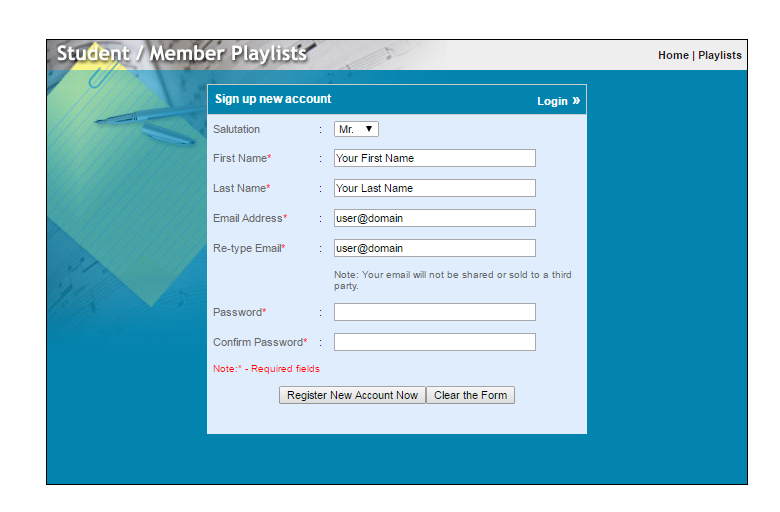
3. Dans l’onglet Playlist, vous devez aller sur Sign up pour créer votre compte utilisateur
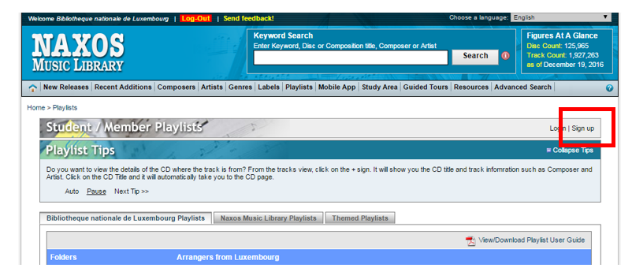
naxos1 naxos2

4. Télécharger l’application désirée : Naxos Music Library (NML) or Naxos Music Library Jazz (NML Jazz)

5. Lancer l’application et logez-vous avec vos identifiants Naxos et pas ceux de votre carte lecteur Bibnet

6. Vous pouvez dès maintenant écouter de la musique à travers de votre téléphone ou tablette.

Les nouvelles playlists Merry Christmas et Merry Christmas Jazz disponibles dans les bases de données Naxos Music Library et Naxos Music Library Jazz ont été conçues par le Cedom de la Bibliothèque nationale.

Le Consortium Luxembourg vous souhaite de bonnes fêtes de fin d’année !

 

New Springer Ebooks 2016

Springer ebooks Teaser

Consortium Luxembourg is pleased to announce that we upgraded our Springer ebook collection.

Access is provided to all English language Springer e-books published in 2016 (German titles are unfortunately excluded). The books cover a variety of subjects including:

Science, Technology and Medicine (STM) Collection (Springer Science publications)

  • Biomedical & Life Science
  • Business & Economics
  • Chemistry & Materials Science
  • Computer Science
  • Earth & Environmental Science
  • Energy
  • Engineering
  • Mathematics & Statistics
  • Professional & Applied Computing

Humanities, Social Sciences Collections (Palgrave plus Springer Science publications)

  • Behavioral Science & Psychology
  • Business & Management
  • Economics & Finance
  • Education
  • History
  • Law & Criminology
  • Literature, Cultural and Media Studies
  • Political Science & International Studies
  • Religion & Philosophy
  • Social Sciences


Let’s recall, Consortium Luxembourg is offering access to all following Ebook publications from Springer:

2005-2013 Complete, 2014: Computer Sciences only, 2015 Complete, 2016 English titles only (HSS + STM)


All ebooks can also be found and accessed via findit.lu and a-z.lu.

Alternatively, you may access all of the available Springer ebooks here.

All ebooks can be accessed from anywhere with a valid library subscription of National Library, University, LIST or LIH.

Suppression d’adresses IP locales / Deletion of local IP addresses

Version française:

Important : A partir du 10 Janvier l’accès aux ressources électroniques sous licencie sera uniquement possible via le serveur proxy.

Cela signifie que les adresses IP locales de l’Université, LIST et LIH ne donneront plus d’accès direct aux ressources numériques.

Pourquoi ? Cette mise à jour des accès améliorera la collecte de statistiques d’usage.

Pour continuer à utiliser vos bases de données sans interruption, nous vous proposons deux solutions :

  • Modifier vos bookmarks manuellement en ajoutant l’extension .proxy.bnl.lu à la fin du nom de domaine

Exemples :

L’accès au site Nature devient http://www.nature.com.proxy.bnl.lu/ au lieu de http://www.nature.com/

L’accès à un journal particulier du site Springer devient http://link.springer.com.proxy.bnl.lu/journal/10958 au lieu de http://link.springer.com/journal/10958

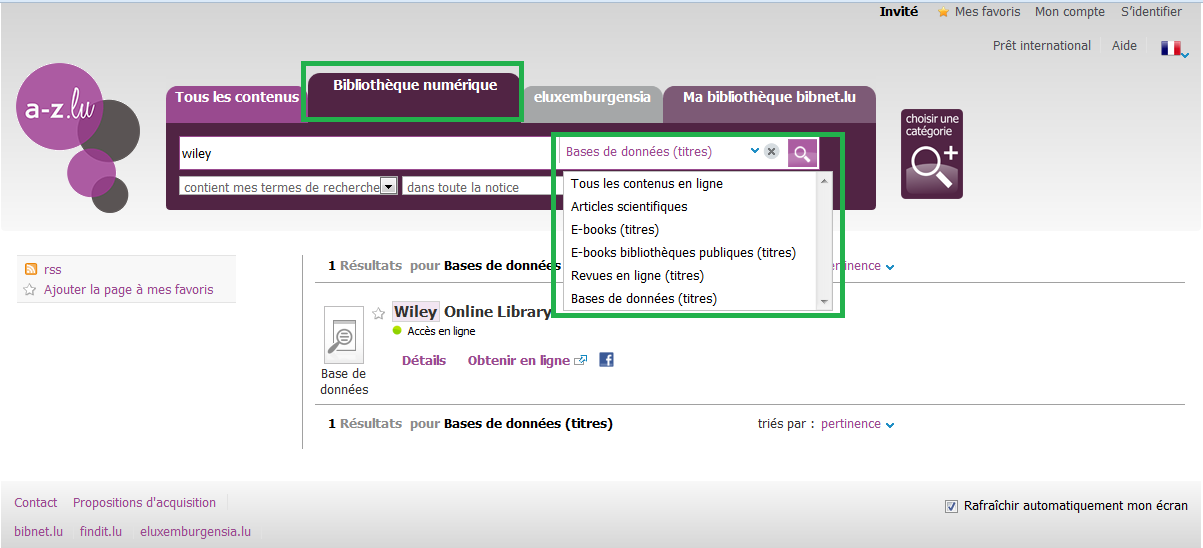
  • Utiliser le moteur de recherche unifié a-z.lu, cliquer sur l’onglet Bibliothèque numérique et introduire le nom de la base de données, journal ou ebook concernés.

Exemple :

Pour accéder à la base de données Wiley, veuillez utiliser le lien « Obtenir en ligne ».

az.luip

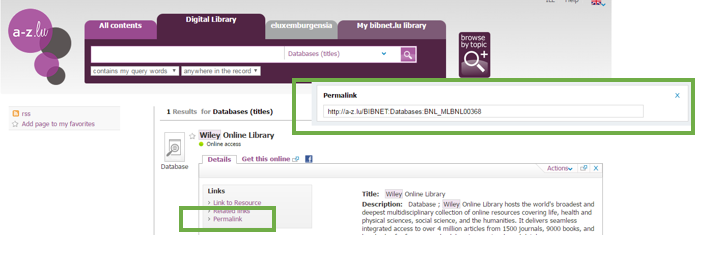
Pour modifier votre bookmark, cliquez sur le Permalien dans l’onglet « Détails » .

az.luip2

Si vous avez des questions ou des problèmes de connexion, n’hésitez pas de nous envoyer un mail à help@findit.lu.

Merci pour votre compréhension.

English version

Important: From 10th January on, access to licensed electronic resources will be only possible via the proxy server.

This means that you will not have access anymore to those digital resources through the local IP addresses of the University, LIST and LIH.

Why? We had to update the registered IP addresses for each database for improving the collection of usage statistics of the electronic resources licensed by the Consortium.

To continue using your databases without interruption or to update your bookmarks, we propose two simple actions:

  • Modify your bookmarks manually by adding the extension .proxy.bnl.lu at the end of the main domain

Examples:

The access to the Nature platform please use http://www.nature.com.proxy.bnl.lu/ instead of http://www.nature.com/.

To access to a specific journal from SpringerLink please use http://link.springer.com.proxy.bnl.lu/journal/10958 instead of http://link.springer.com/journal/10958.

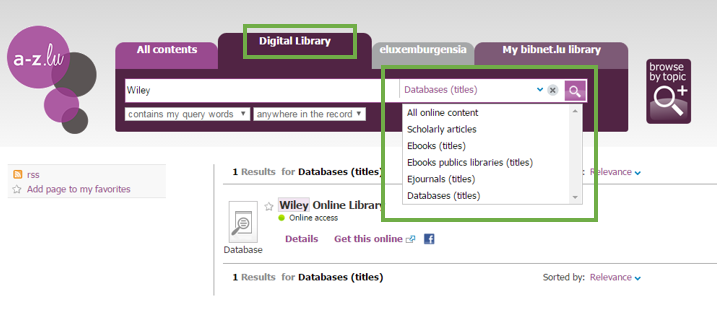
  • Use the a-z.lu search engine, click on the Digital Library tab and enter the name of the database, journal or ebook you would like to access.

Example:

To access the Wiley Online library, click on “Get this online” in the result.

az_en1

To modify your bookmark, click on the “Details”, then “Permalink” and copy/paste the link to your bookmarks.

az_en2

Don’t hesitate to contact us if you have connection problems or additional questions at help@findit.lu

Thank for your understanding.